价格跟踪
精准跟踪商品价格,自动降价提醒,让你不错过任何一次省钱机会。
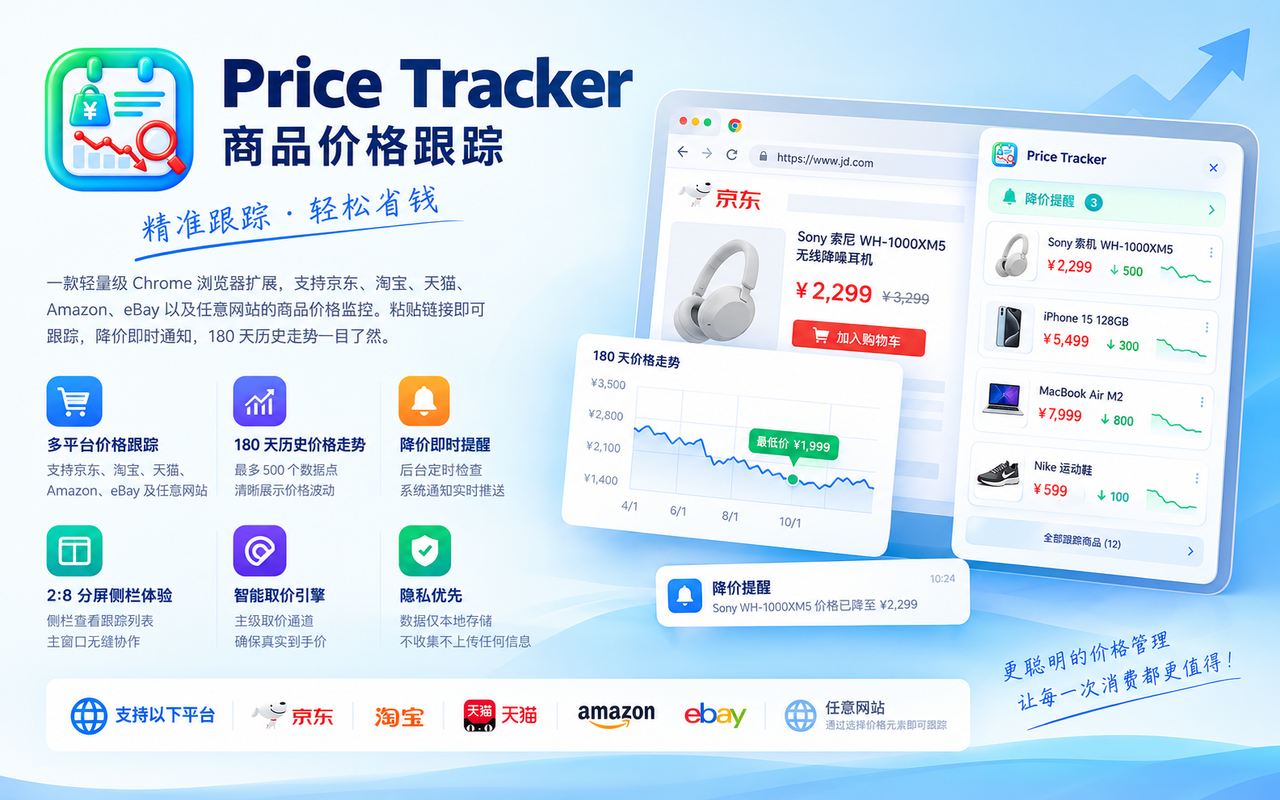
精准跟踪商品价格,自动降价提醒,让你不错过任何一次省钱机会。
支持跟踪任意网站的价格——不仅限于电商平台。京东、淘宝、天猫、亚马逊、ebay 等主流电商已内置优化,其他网站同样可用。
点击商品页上的任意价格数字即可跟踪——无论是到手价、促销价、会员价还是划线价,你点哪个就跟踪哪个。系统通过用户自选选择器精确定位,不依赖平台接口,不怕页面改版。
自动记录每次变价(价格未变不产生记录,节省存储)。最多保留 500 个价格点 / 180 天历史。商品详情页底部注入价格图表面板,直观查看价格走势。
价格下降时自动发送系统通知,即使浏览器在后台也能第一时间收到提醒。
手动刷新:点击「刷新全部」,当前标签页依次导航到每个商品页直读真实价格。
自动刷新:每 3/6/12/24 小时(可配置)自动全量检查一次。
取价优先级:主标签页直读(你看到的)→ 后台标签页兜底(真实渲染环境)。
商品数据自动同步到云端(通过 Todo 子任务),多设备间无缝切换。
如果价格元素位置变化(页面改版、价格数字换了位置),点击商品卡片上的「校准选价」按钮,重新点选价格元素即可。
| 平台 | 域名 | 特殊优化 |
|---|---|---|
| 京东 | item.jd.com | ASIN 提取、SPA 渲染等待 |
| 淘宝 | item.taobao.com | id + skuId 保留、跟踪参数剥离 |
| 天猫 | detail.tmall.com | id + skuId 保留、参数名大小写兼容 |
| 亚马逊 | amazon.com/dp/ASIN | ASIN 提取、多站点支持(.co.jp/.de/.fr 等) |
| ebay | ebay.com | 基础支持 |
| 任意网站 | 无限制 | 通用探针 + 用户自选选择器 |
侧栏(约 20% 宽度)展示关注列表,主窗口(约 80% 宽度)展示商品详情与价格图表,形成沉浸式购物体验。
批量刷新时,商品页顶部显示蓝色进度条,实时显示「已检查 N/M 件(成功 X / 失败 Y)」,整批完成后 3 秒淡出。
手动刷新最小间隔 90 秒(防止高频触发平台安全监控);同商品冷却 3 分钟(避免重复取价);批次间隔 8~15 秒随机抖动(模拟人类操作节奏)。
Track prices on any website — not limited to e-commerce platforms. JD, Taobao, Tmall, Amazon, eBay and other major e-commerce sites have built-in optimizations. Other websites work too.
Click any price number on a product page to track it — whether it's the final price, promo price, member price, or strikethrough price. The system uses a user-selected CSS selector for precise targeting. No platform API dependency, immune to page redesigns.
Automatically records every price change (no record created if price is unchanged, saving storage). Keeps up to 500 price points / 180 days of history. A price chart panel is injected at the bottom of the product detail page for intuitive trend viewing.
Automatically sends system notifications when prices drop. You'll get alerted instantly even when the browser is in the background.
Manual refresh: Click "Refresh All" and the current tab navigates to each product page sequentially to read real prices.
Auto refresh: Automatically checks all items every 3/6/12/24 hours (configurable).
Price reading priority: Active tab direct read (what you see) → Background tab fallback (real rendering environment).
Product data automatically syncs to the cloud (via Todo subtasks) for seamless switching between devices.
If the price element position changes (page redesign, price number moved), click the "Recalibrate" button on the product card to re-select the price element.
| Platform | Domain | Optimization |
|---|---|---|
| JD.com | item.jd.com | ASIN extraction, SPA render waiting |
| Taobao | item.taobao.com | id + skuId retention, tracking parameter stripping |
| Tmall | detail.tmall.com | id + skuId retention, case-insensitive parameter names |
| Amazon | amazon.com/dp/ASIN | ASIN extraction, multi-site support (.co.jp/.de/.fr, etc.) |
| eBay | ebay.com | Basic support |
| Any website | Unlimited | Universal probe + user-selected CSS selector |
The sidebar (~20% width) displays your watchlist, while the main window (~80% width) shows product details and price charts, creating an immersive shopping experience.
During batch refresh, a blue progress bar appears at the top of the product page showing "Checked N/M (Success X / Failed Y)" in real-time. It fades out 3 seconds after the batch completes.
Manual refresh minimum interval: 90 seconds (prevents triggering platform security monitoring); Same product cooldown: 3 minutes (avoids duplicate price fetching); Batch interval: 8–15 seconds random jitter (simulates human operation rhythm).